
The 78% Trust Gap: Intuit Just Put AI Agents Inside QuickBooks and Mailchimp — Here's How Small Businesses Turn Them On Safely
For fifteen years, small businesses were told the same thing about AI: pick a tool, pay for it, learn it. On August 31, 2026, Intuit retired that advice — putting AI agents directly inside QuickBooks and Mailchimp, the software millions of businesses already run on, through a new partnership with Perplexity. The question is no longer "which AI should I buy?" It is "which built-in agents should I switch on, and with how much permission?" Here is what launched, what the trust data says, and the 4-step checklist to turn embedded agents on safely.
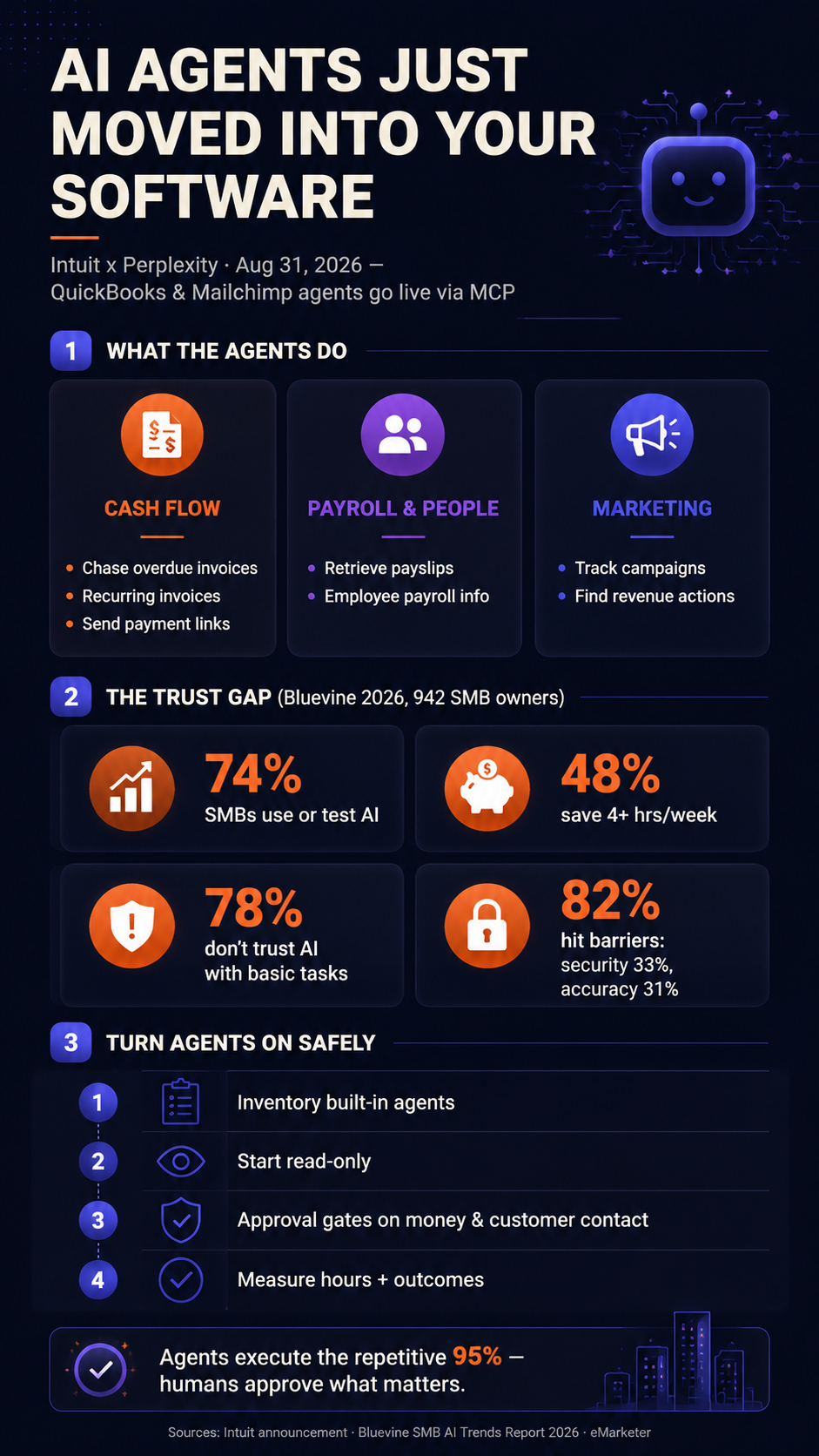
For fifteen years, small businesses were told the same thing about AI: pick a tool, pay for it, learn it. On August 31, 2026, Intuit retired that advice. The company behind QuickBooks and Mailchimp announced a strategic partnership with Perplexity that puts AI agents directly inside the two pieces of software millions of small businesses already run on — no new platform to buy, no data migration, no integration project. Owners can now chase overdue invoices, set up recurring invoices, send payment links, pull payslips, and analyze marketing campaigns through Perplexity Computer, with their existing QuickBooks and Mailchimp accounts doing the executing. The question owners face is no longer "which AI should I buy?" It is "which built-in agents should I switch on — and with how much permission?"
What Actually Launched
The partnership works through MCP connectors — Model Context Protocol links that let an AI assistant reach into business software securely. Owners authenticate with their existing QuickBooks or Mailchimp credentials, and data is accessed through Intuit's platform, wrapped in the security, privacy, and compliance controls already protecting it. Three workflow areas went live for U.S. users on day one. Cash flow: the agent follows up on overdue invoices, sets up recurring invoices, and sends payment links. Payroll and people: it retrieves payslips and employee payroll information on request. Marketing: it tracks Mailchimp campaign performance and surfaces the high-impact actions most likely to drive revenue. Closing "the gap between finding answers, getting personalized insights and taking decisive action" is how Intuit CTO Alex Balazs described the goal.
Read the launch closely, though, and the design leans read-and-prepare rather than fully autonomous: it retrieves payslips and drafts follow-ups, but the announcement doesn't describe executing payroll, and the permission model — who approves what — is the open question analysts flagged. This is Intuit's third agent tie-up, after connecting QuickBooks to ChatGPT and Claude for invoicing, payroll, and lending. The direction of travel is unmistakable: the agents are moving into the software, not waiting beside it.
74%
SMBs Already Using or Testing AI Tools
Bluevine 2026 SMB AI Trends Report
48%
Saving 4+ Hours a Week With AI
Bluevine, 2026
78%
Don't Fully Trust AI With Basic Tasks Without Oversight
Bluevine, 2026
82%
Hit Barriers to Deeper AI Use — Security 33%, Accuracy 31%
Bluevine, 2026
Why Embedding Beats Another App
That 78% figure is why this launch matters more than one partnership. Bluevine's report — 942 owners surveyed, data from 200,000+ small business accounts — found adoption everywhere but depth rare: 74% use or test AI, nearly half save four-plus hours a week, yet most stall at chat because they won't hand an untrusted tool the keys to real work — even though those low-level tasks are precisely the ones that would save the most time. Where owners spend serious money on AI, the premium goes to tools embedded in software they already use daily. People don't learn to trust a new app; they extend the trust they already have in QuickBooks to the agent inside it. Trust stops being a purchase decision and becomes a permission setting.
Where the Line Sits: Useful vs. Risky
The useful-versus-risky line is a familiar one. An agent reading your books, drafting invoice chasers, and flagging campaign moves is low-risk, high-frequency work — the same class of execution that our payment operations breakdown showed can cut a 60-hour weekly money back-office to 45 minutes, with human approval gates on every dollar and every customer message. Agents that send money or customer-facing messages are the risky tier: analysts at eMarketer note that trust in agentic finance tools depends on safeguards — approval prompts pushed to the owner's phone, opt-in price limits — being explicit rather than implied. So set the gates yourself: read-and-draft on by default, human approval before anything leaves the building. That's textbook human-in-the-loop design, and it applies as much to agents your vendor ships as to ones you build.
There's a mirror-image gap, too: if your critical software is an older or vertical tool with no MCP connector at all, browser agents — which click and type inside any program like a person — are the complement for exactly that stack.
A 4-Step Checklist to Turn Embedded Agents On Safely
- 1 Inventory your stack's built-in agents. QuickBooks, Mailchimp, Google Workspace, Microsoft 365 — most businesses already pay for two or three agent-ready tools. The audit method in our workflow integration breakdown structures this.
- 2 Switch on read-only first. Connect, let the agent report, retrieve, and draft — then measure for a week. The four-hour weekly saving starts with lookups and summaries, not actions.
- 3 Set approval gates before enabling actions. Invoice follow-ups and payment links wait for your tap. Money movement and customer contact always get a human click — that combination is what makes an agent safe to leave running.
- 4 Measure and decide. Hours saved, invoices recovered, campaigns acted on — 52% of AI-using SMBs see a return, and the difference is measurement. If a workflow can't show its numbers in two weeks, switch it off.
One caution: embedded agents inherit your processes, warts included — sloppy invoice terms get chased faster, stale customer records get messaged faster. Clean up the definition first, or you're automating one of the 95% of AI projects that fail on process, not technology. And the hours compound: owners who hand off admin systematically get a full day back each week, the pattern behind our manager multiplier data.
At GoHuman AI, we build exactly this class of agent layer for small and medium-sized businesses — embedded in the tools that already support it, extended across the ones that don't, with human approval gates on anything irreversible and audit logs on everything else. Your software just learned to act. The owners who win with it will be the ones who decide, deliberately, where that action is allowed — and keep the human decision where the money and the customer are.
Related Reading
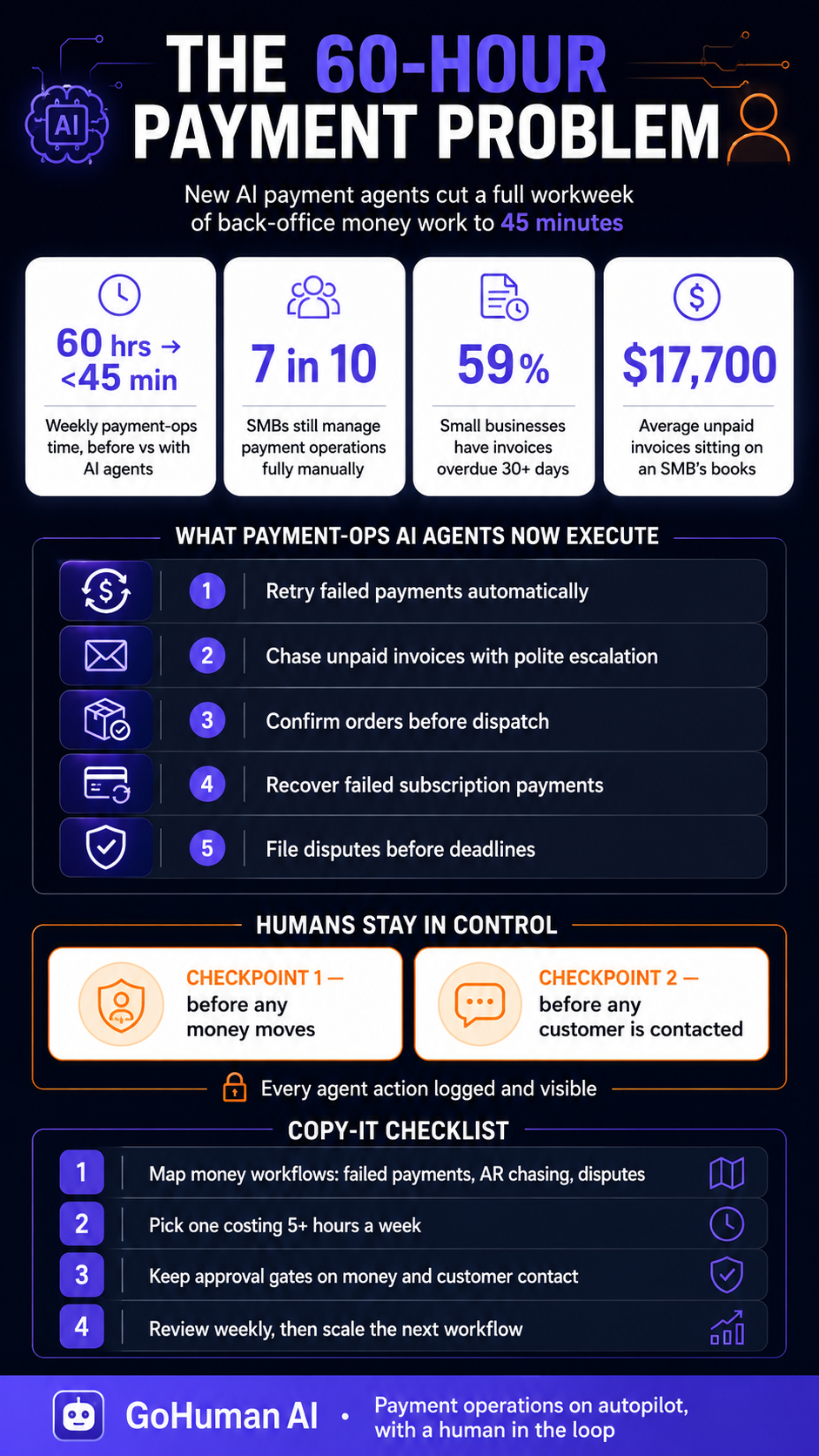
The 60-Hour Payment Problem: New AI 'Super Agents' Just Turned Back-Office Payment Ops Into a 45-Minute Job
The execution playbook for chasing invoices — with approval gates on every dollar.
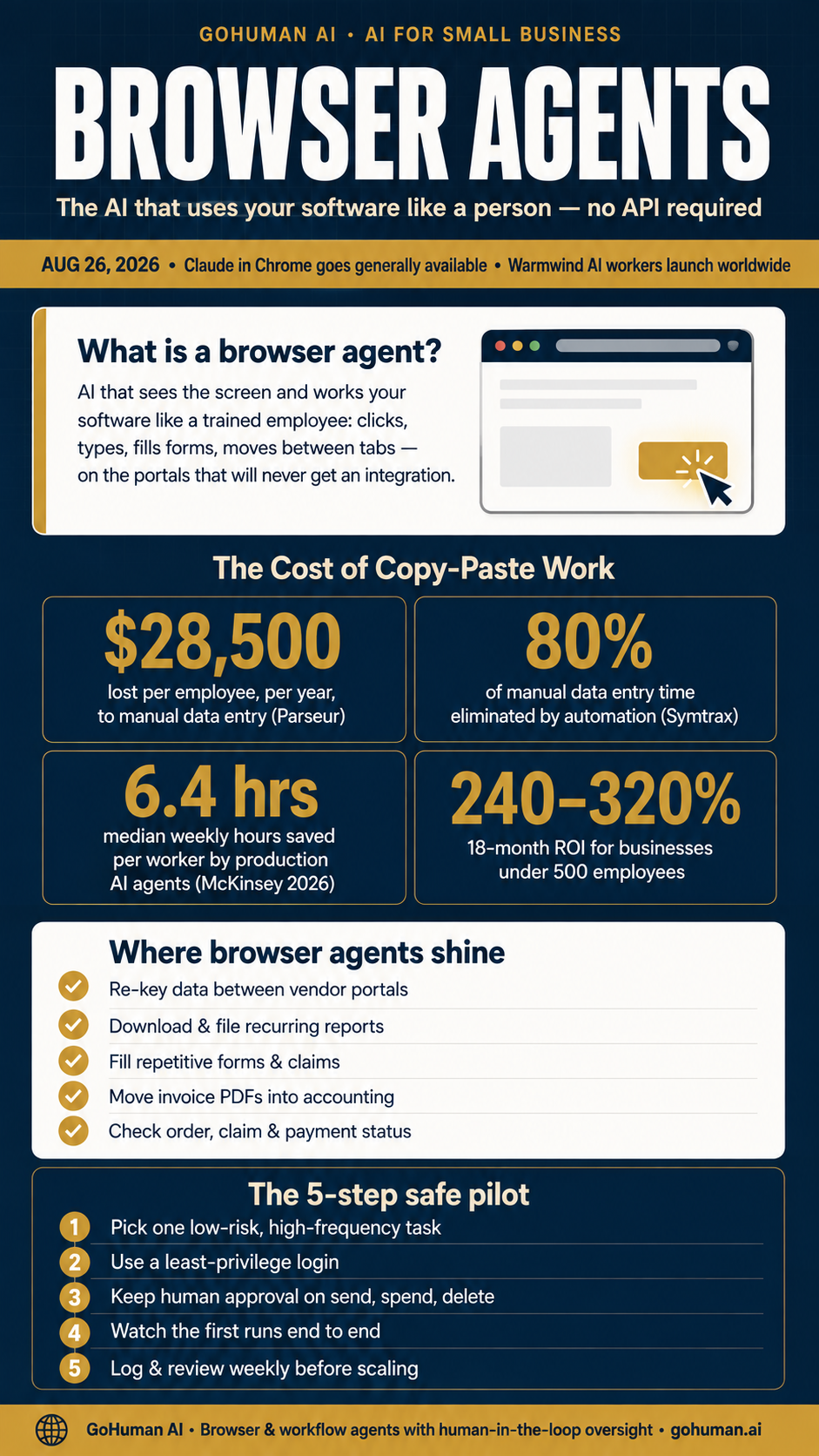
The $28,500 Copy-Paste Problem: Browser Agents Just Went Mainstream
For the software that has no AI integrations at all.
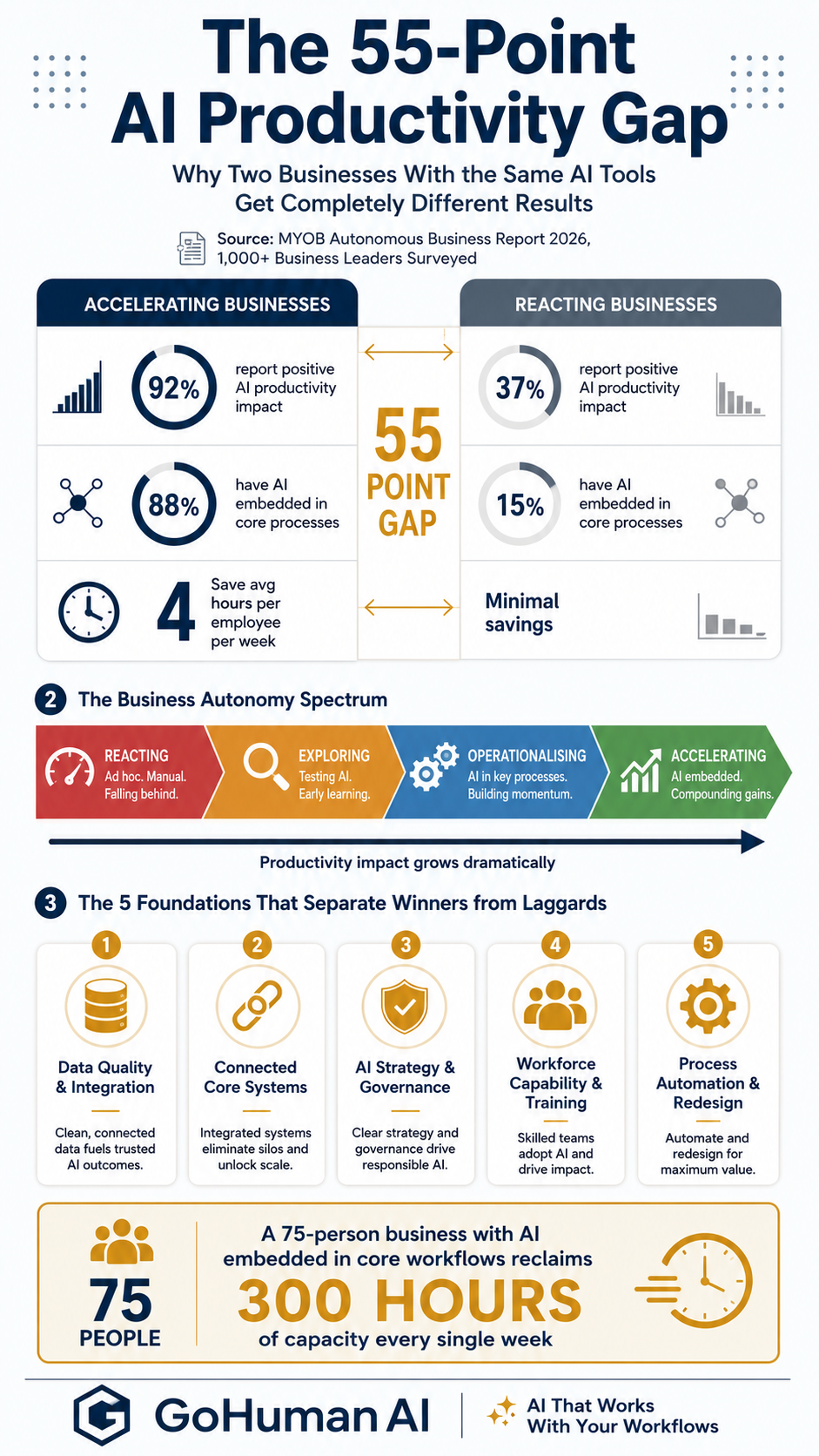
The 55-Point Productivity Gap: Why Two Businesses With the Same AI Tools Get Completely Different Results
Why embedding AI in core workflows — not buying more tools — is what pays.
Your accounting and marketing tools may already have agents waiting to be switched on. Let us show you which built-in workflows to enable first — read-only to start, approval gates on every dollar and every customer message.